
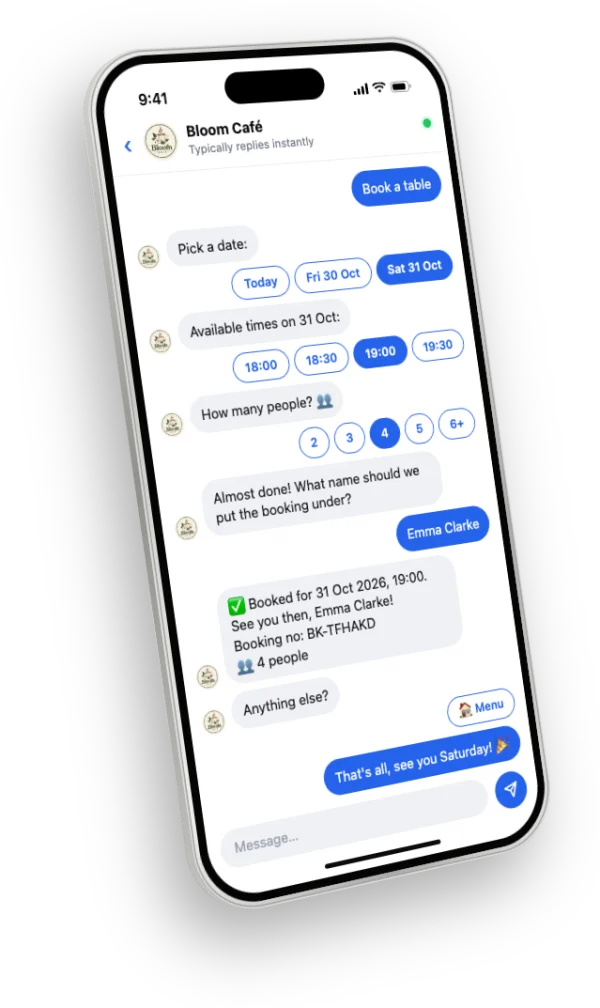
“Do you have anything on Saturday?” — “What time?” — “2pm?” — “Sorry, 4pm?” Booking by message can take ten messages and an hour, and two people asking at once can end in a double booking.
A booking flow in the chat fixes this: the customer only sees the times you’re actually free, picks one, and gets a confirmation on the spot.
What a good booking flow needs
- Your services with price and duration (or, for restaurants, the number of people).
- Opening hours, breaks and days off, so only real free times are offered.
- A confirmation with a booking number the customer can refer to.
- One list of all bookings, where you can mark visits completed or no-show.
For salons, clinics and studios
Customers choose a service, then a day and a free time. If you have several staff, let customers choose who they book with — and allow several bookings at the same time with different people. Longer services automatically take more of the day.
For cafés and restaurants
Table reservations need a date, a time and the number of people. Offer them in the chat menu next to your food menu and opening hours, so guests can reserve in the same conversation where they asked about the menu.
Put a booking link in your bio
Not everyone starts with a message. A booking page link in your Instagram bio, your Facebook Page and your website lets people book in a few taps from anywhere.
How PiggoChat helps
PiggoChat takes appointments and table reservations inside Instagram and Messenger DMs. It only offers free times based on your hours, holidays and existing bookings, confirms with a booking number, and lists every booking in your dashboard.
On Premium, customers can choose a staff member. You also get a booking page link for your bio, and a notification for every new booking.